Summary
Dynamic currency conversion (DCC) is a payment process that uses a marked-up exchange rate before a peso transaction reaches your bank, often costing foreigners in Mexico more. It appears at terminals, ATMs, and payment links and is usually avoided by paying in pesos (MXN).
Why Are Foreigners in Mexico Losing 9% or More on Card Transactions?
The reason is something called dynamic currency conversion, and it shows up quietly at credit card terminals, ATMs, and even online payment links.
It’s not a scam.
But it is designed to cost you more money every single time you accept it.
Even if you “only” lose 1% per transaction, that can add up to hundreds of dollars a year on everyday expenses – groceries, dining out, medical visits, school costs, and routine services.
Most people never notice because the loss is hidden inside the exchange rate.
To break down how this works, we spoke with George Reavis, founder of MexEdge, a company that helps protect Americans and Canadians against currency fluctuation risk when they are buying or building property in Mexico.
If you live in Mexico or spend significant time here, this is one of the most important – and easiest – money mistakes to understand and avoid.
The Hidden Fee No One Warns You About
Dynamic currency conversion (often shortened to DCC) doesn’t look like a fee.
Instead, it’s framed as a convenience.
You’re shown a screen that looks helpful: Your purchase neatly converted into USD or CAD, often with reassuring language that makes it feel safer or more official.
Most people assume this is normal…or even helpful.
In reality, it’s neither.
And once you understand how it works, you’ll see why foreigners routinely overpay for everyday expenses without realizing it.
What Is Dynamic Currency Conversion (DCC)?
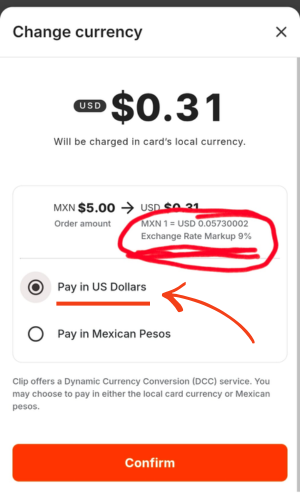
Dynamic currency conversion happens when the payment processor – not your bank – converts a peso transaction into your home currency before it ever reaches your bank.
Instead of letting your credit card issuer or bank handle the exchange, the terminal, ATM, or payment platform does it for you using their own exchange rate.
That rate is marked up.
In practice, those markups can be 9% or more, which is significantly worse than what most banks or credit cards would apply on their own.
“If the transaction is converted before your bank ever sees it, you’ve already lost,” explains Reavis. “At that point, you’re no longer getting your bank’s exchange rate – you’re getting the processor’s.”
Why Does Paying in USD or CAD in Mexico Cost More Than Paying in Pesos?
When you use a credit or debit card abroad, your bank already knows how to convert currencies.
Most banks and card issuers convert transactions within 1-3% of the spot rate or “mid-market rate” that you see on apps like XE or Google.
This applies whether your home currency is USD, CAD, or another.
Dynamic currency conversion overrides that entire process.
Instead of letting your bank handle the exchange, the payment processor converts the charge into your home currency first, using its own inflated exchange rate.
The processor keeps the spread between the real market rate and the worst rate they offer you.
Even if your card charges a foreign transaction fee, accepting DCC is almost always more expensive than paying in pesos and letting your bank do the conversion.
On a single purchase, the difference may feel minor.
Over weeks, months, and years of daily spending in Mexico, it adds up quickly.

Where Dynamic Currency Conversion Shows Up
One reason dynamic currency conversion is so effective is that it doesn’t appear in just one place.
Foreigners living in Mexico encounter it across multiple everyday payment situations, often when they’re distracted, rushed, or assuming the system is neutral.
You’ll see dynamic currency conversion most often when paying through:
- Card terminals at restaurants, shops, clinics, and service providers
- App-based processors like Clip or Square
- ATMs throughout Mexico
The screens may look different, but the goal is always the same: To get you to approve the currency conversion before your bank ever sees the transaction.
Language and Design That Push You to Accept
Across all of these platforms, dynamic currency conversion relies on similar wording and design cues.
“The language is designed to make you think paying in USD or CAD is the only option,” says Reavis. ”But it’s not the only option. Sometimes you just have to look for it.”
You’ll commonly see prompts like:
- Accept conversion
- We’ll convert this to USD or CAD for you
- Screens that imply declining may cancel or disrupt the transaction
In many cases, the option to pay in pesos exists, but it’s hidden behind:
- Other options
- Change currency
- Advanced settings
The result is consistent across terminals, payment links, and ATMs, and most people accept the conversion simply because the interface nudges them to.
How to Avoid Dynamic Currency Conversion (DCC)
- Look for the currency shown before confirming payment.
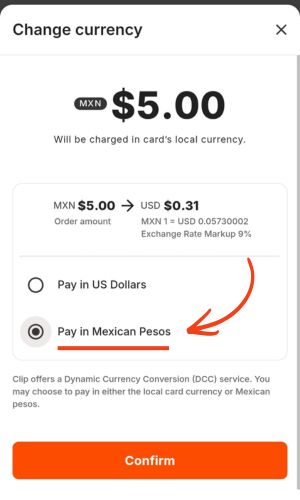
- If USD or CAD appears (or your home currency), select “change currency” or “other options.”
- Choose MXN (Mexican pesos).
- Confirm the transaction.
Once you know what to look for, avoiding dynamic currency conversion becomes straightforward.
Online Payment Links & Digital Invoices
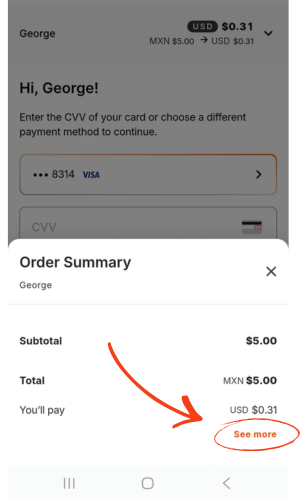
Payment links and digital invoices sent through platforms like Clip, Square, or similar processors are one of the most common ways foreigners living in Mexico lose money without realizing it.
When you open the link to pay, they frequently default to your home currency – even when the original charge is in pesos.
In many cases, the screen shows only the home-currency amount, creating the impression that no other option exists.
The peso option is often there, but it’s hidden behind:
- Other options
- Advanced settings
- An extra menu most people never think to open
If you don’t actively switch the payment to MXN (pesos), the processor applies its own exchange rate before your bank ever sees the transaction.
Card Terminals & Payment Processors
Restaurants, Clinics, Shops, Services
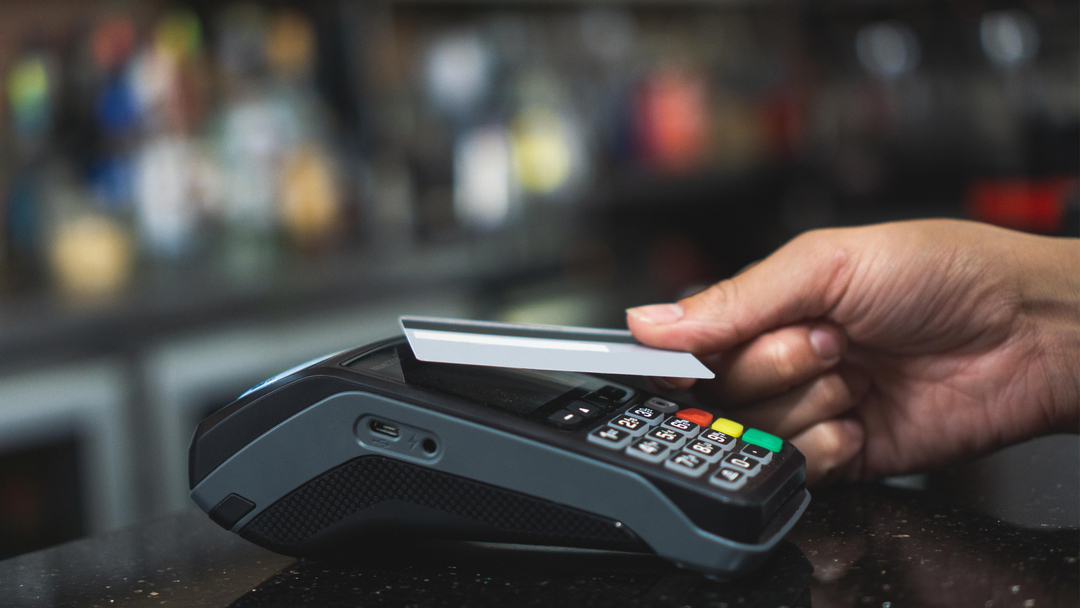
When you insert or tap a foreign card, the terminal immediately recognizes it as non-Mexican.
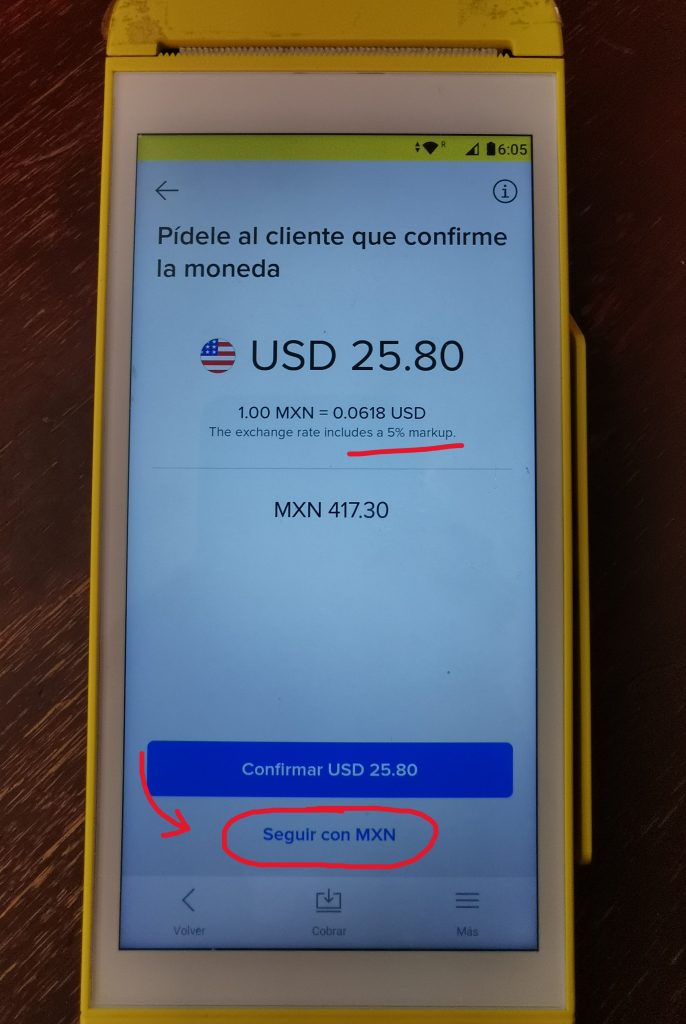
If the terminal uses dynamic currency conversion, the payment processor steps in before your bank, converting the peso charge into USD, CAD, or your home currency using its own exchange rate.
That’s when you’ll see prompts asking you to “accept” the conversion.
If you accept, the conversion is locked in, and your bank never sees the peso amount.
To avoid this: Be aware.
Always look and see if the charge is listed in USD/CAD or MXN.
Then, make sure to look for the option to decline paying in USD or CAD and find the option to pay in MXN.
This is not always easy to find. (Intentionally)
But once you get the hang of it, it becomes easier.
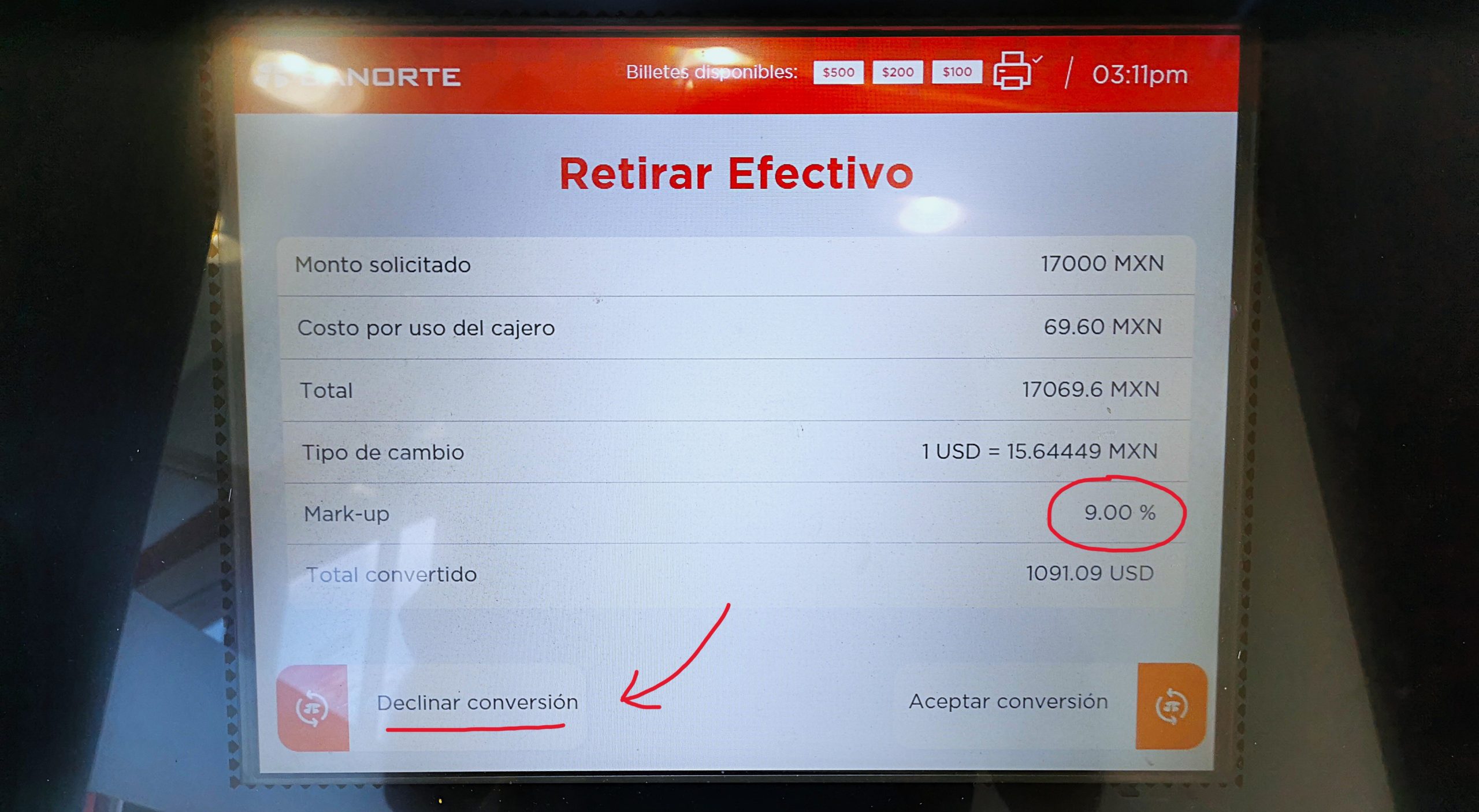
ATMs in Mexico
ATMs use similar tactics, but the process is more direct.
After entering your withdrawal amount, you may be asked if you want to “accept” the conversion.
Here’s the key point: Declining the conversion does not cancel your withdrawal.
It simply means you’re declining the ATM’s exchange rate and letting your bank handle the conversion instead – which is almost always better.
Select “Decline,” and you’ll still receive your cash.
Key Facts about Dynamic Currency Conversion (Recap)
-
Dynamic currency conversion (DCC) occurs when a payment processor converts a peso transaction into USD or CAD before it reaches your bank .
-
The processor sets its own exchange rate, which is marked up compared to the market rate .
-
DCC markups can reach 9% or more on individual transactions .
-
Most banks and card issuers convert transactions within 1-3% of the spot or mid-market rate.
-
DCC commonly appears at card terminals, ATMs, and online payment links in Mexico .
-
Declining DCC does not cancel the transaction; it allows your bank to handle the conversion instead .
-
Paying in Mexican pesos (MXN) is almost always cheaper than paying in USD or CAD when DCC is offered .
Building or Buying Property in Mexico? Read This.
When you’re moving larger sums of money for property purchases or construction, the impact of currency swings can have a dramatic effect on your overall cost.
MexEdge helps Americans and Canadians protect their property purchases in Mexico from currency fluctuations – so unexpected moves in the peso don’t derail plans.
Whether you’re buying or building property in Mexico, MexEdge locks in a guaranteed exchange rate at the start of your project – so no matter what happens with the peso, you’re protected.
Book a FREE Currency Risk Evaluation Call, and MexEdge will show you…
- How much currency risk exists with your purchase
- What options are available
- How much you can save with MexEdge vs gambling on exchange rates
Book Your Free Currency Risk Evaluation